Persistent memory for AI
Your best ideas.
Remembered.
Pick up where you left off. Engram carries your preferences, projects, and context across conversations with Claude and ChatGPT.
One shared memory. Across your AI tools.
Give your agents context that lasts. Turn conversations into structured knowledge they can recall, share, and build on.
Open source · MCP · Python SDK · REST API
 Shared memory
A little context goes a long way
“Keep updates short and use Python examples.”
How it works
Your AI finally remembers.
Tell Claude your preferences in the morning. Ask ChatGPT to pick up where you left off at night. Engram keeps one shared memory across all your AI tools.
"I'm working on a marketing plan for my SaaS launch. Target audience is solo developers. Budget is $5k."
Engram remembers this
Shared memory hub
Always in sync
"What marketing channels should I focus on?"
ChatGPT already has your memory
Switch AI tools freely.
Use Claude for coding, ChatGPT for brainstorming. Your memory follows you. No more repeating yourself.
Picks up where you left off.
Start a conversation on Monday, continue it on Friday. Engram remembers your projects, decisions, and preferences across sessions.
Your data, your control.
See exactly what Engram remembers in your dashboard. Edit, delete, or organize your memories anytime.
See it in action
One memory, two AIs.
Save a memory in Claude, recall it in ChatGPT — and vice versa. Connected tools can save to and recall from the same Engram memory.
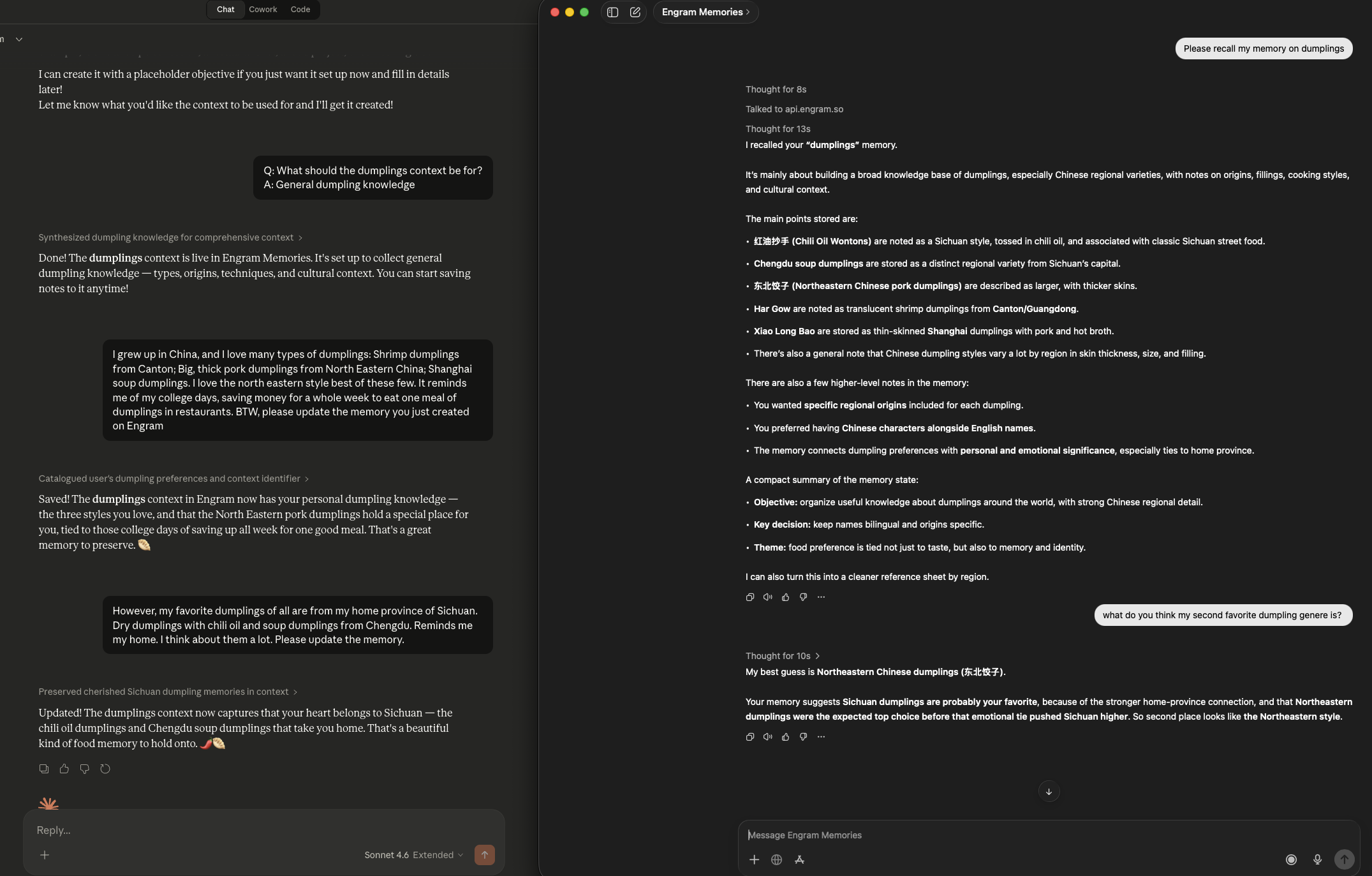
Memory created in Claude (left) → recalled and queried in ChatGPT (right)
Setup
Ready in 2 minutes.
Connect Engram to Claude and ChatGPT. No coding required.
Connect to Claude
Sign up for Engram
Create your free account at app.engram.so
Add as a Connector
Add https://api.engram.so/mcp/sse in Claude Connectors, then sign in to Engram
Start chatting
Enable the connector, then ask Claude to save or recall a memory
Connect to ChatGPT
Sign up for Engram
Create your free account at app.engram.so
Add the Engram GPT
Search "Engram" in the GPT store, or create a Custom GPT with Engram Actions
Start chatting
ChatGPT will share memory with Claude and other AI tools
Memory is more than a key-value store.
You've probably tried the basics: stuff the chat history in the prompt, bolt on a vector search, or store flat facts in a database. It works — until it doesn't.
10,000 tokens of chat history. Your agent has the information — buried in noise. Costs spike. Latency doubles. And it still misses the one fact that matters.
Your retriever returns "I live in Boston" AND "I moved to Vancouver." Your agent picks one at random. The user corrects it for the third time.
You store 500 facts. Which ones matter right now? They all look the same. No priority, no type, no decay. Your agent dumps everything into the prompt and hopes for the best.
These approaches store information. Engram builds knowledge.
The Solution
What makes Engram different.
Not just storage and retrieval. Engram understands, organizes, and prioritizes what your agent knows.
Every memory has a type.
Engram doesn't store flat strings. Every piece of knowledge is classified — FACT, DECISION, PREFERENCE, GOAL, PROCEDURE, PRINCIPLE — so your agent knows the difference between what a user likes and what they decided.
Not all memories are equal.
Every bullet gets a salience score based on importance and recency. Critical decisions rank higher than casual mentions. Stale knowledge decays over time. Your agent always knows what matters most right now.
Fits your context window.
Tell Engram your token budget. It assembles the most important, most relevant knowledge that fits — not just the most similar. No overflow, no truncation, no wasted tokens.
Handles updates, not just appends.
"I live in Boston" followed by "I moved to Vancouver" doesn't return both. Engram detects the contradiction, supersedes the old fact, and keeps a version history.
Patterns emerge automatically.
After enough conversations, Engram detects recurring patterns and forms schemas: "user prefers concise technical answers" or "team always reviews PRs before merging." Structure emerges from usage.
One memory, every model.
Connect Engram to Claude via MCP, ChatGPT via Actions, or any agent via REST API. Tell Claude something in the morning, ask ChatGPT about it at night. Same knowledge, everywhere.
How it works
Three API calls. Structured memory.
No vector database to manage. No retrieval pipeline to tune. Your agent commits what it learns, recalls what it needs, and knowledge self-organizes over time.
Commit
Your agent saves what it learned.
Raw conversation goes in. Typed, structured knowledge comes out. Facts, decisions, preferences, goals — each extracted, classified, and scored for importance.
# Set ENGRAM_API_KEY and ENGRAM_CONTEXT_ID from your dashboard.
curl --fail-with-body -X POST \
  "https://api.engram.so/contexts/$ENGRAM_CONTEXT_ID/commit" \
  -H "Authorization: Bearer $ENGRAM_API_KEY" \
  -H "Content-Type: application/json" \
  -d '{"agent_id": "my-agent", "content": "User prefers dark mode", "content_type": "conversation"}'
→ Extracts typed knowledge from your content
→ Returns counts of added, updated, and merged bullets
→ Results depend on the content and existing memory
Materialize
Your agent recalls what it needs.
Not a similarity search. Engram assembles the most important, most relevant knowledge within your token budget. What comes back is ready to inject into any prompt.
# Set ENGRAM_API_KEY and ENGRAM_CONTEXT_ID from your dashboard.
curl --fail-with-body -X POST \
  "https://api.engram.so/contexts/$ENGRAM_CONTEXT_ID/materialize" \
  -H "Authorization: Bearer $ENGRAM_API_KEY" \
  -H "Content-Type: application/json" \
  -d '{"query": "user preferences", "token_budget": 4000}'
→ Returns rendered_text within your token budget
→ Ranked by: relevance × salience
→ Includes relevant stored knowledge
Consolidate
Knowledge self-organizes.
Over time, Engram deduplicates, merges related facts, forms schemas from recurring patterns, and decays stale knowledge. Your context stays clean no matter how many conversations flow through.
# Set ENGRAM_API_KEY and ENGRAM_CONTEXT_ID from your dashboard.
curl --fail-with-body -X POST \
  "https://api.engram.so/contexts/$ENGRAM_CONTEXT_ID/consolidate" \
  -H "Authorization: Bearer $ENGRAM_API_KEY" \
  -H "Content-Type: application/json" \
  -d '{}'
→ Returns a report of consolidation changes
→ Organizes accumulated knowledge
→ Reports merges, schemas, and archived memories
Not just another RAG
Beyond search. Structured understanding.
RAG finds similar chunks. Flat memory stores facts. Engram organizes knowledge.
Integrations
Integrate in minutes.
Add persistent memory to your agentic stack via MCP, Python SDK, or REST API. Model-agnostic by design.
Complete account and provider-key setup in your Engram dashboard. Follow the Cloud connection guide, or the self-hosting quickstart.
Claude → Settings → Connectors → Add custom connector

Name: Engram
Remote MCP server URL: https://api.engram.so/mcp/sse

Connect and sign in to your Engram account.
Enable Engram in your conversation, then ask:
"List my Engram memories."
Pricing
Free to start. Open source forever.
Self-host the full engine for free. Use the cloud for managed hosting and dashboards.
Free
Everything you need to add memory to your AI agent.
- 3 contexts
- 1,000 bullets per context
- BYOK (bring your own LLM keys)
- Community support
- Dashboard access
- Claude MCP + ChatGPT Actions
Enterprise
Everything in Free, plus power features and dedicated infrastructure.
- Unlimited contexts
- 50,000 bullets per context
- Bullet editing & management
- Full graph explorer
- Dedicated tenant + data isolation
- Custom SLAs + dedicated support
- SSO / SAML + Audit logs
All plans include the open-source SDK. Self-host for free, forever.
Open Source
Fully open source. Not open-core.
The complete Engram engine — extraction, consolidation, materialization, concept graph — is MIT licensed. Self-host it, fork it, extend it. Engram Cloud builds on the memory engine with managed hosting, account access, and a dashboard.
pip install engram-contextdb
Add memory to your agent in 5 minutes.
Free tier. No credit card. Open source.